If you need to switch computers or reformat your computer, you can Deactivate the software off the computer first.
This process will allow you to use your serial number to activate the software when you re-install it again. If you need the installer for the software, you can download here.
How to Deactivate
1.
Make sure the computer you are deactivating the software on is connected to the Internet.
2. Make sure you do not have any anti-virus/firewall software or settings preventing Sure Cuts A Lot from connecting to the Internet.
2. Select Deactivate from under the Help menu in the software.
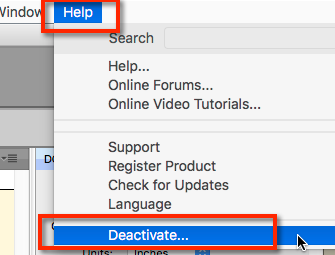
3. If successful, the software should indicate it was deactivated ok.
4. You should now be able to install the software and use your serial to activate again.
You can download the installer if needed from the Support Downloads Page.
Common Problems
1. You get a message indicated you've activate too many times:
You will need to email us at support@craftedge.com. Please include your serial number and an explanation of why you need assistance in activating the software.
2. You've uninstalled the software without deactivating it:
Install the software again and Deactivate it. Uninstalling the software does not deactivate the software.
3. Your computer won't boot and cannot deactivate the software:
You will need to email us at support@craftedge.com. Please include your serial number and an explanation of why you need assistance in activating the software.


 Cart
Cart