 View Cart
Installing Drivers for Windows
In order for "Sure Cuts A Lot" to work with certain cutting machines on a Windows machine, you will need to have the correct driver installed.
How to install the driver for Windows?
1. Connect your Cricut™, Pazzles Inspriation™ Black Cat Cougar/Lynx™ or USCutter™ machine to your computer and turn cutting machine on
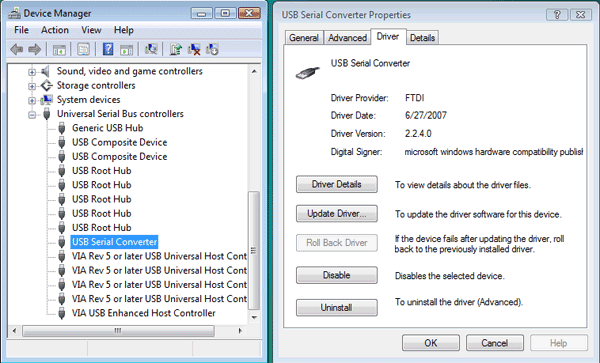
2. If you do not have the driver installed, Windows will indicate that is has "Found New Hardware", and should prompt you to install a driver. If you do not get this, the driver may already be installed on your computer, and you should see the entires in your "Device Manager" as in the screenshot at the bottom of this page.
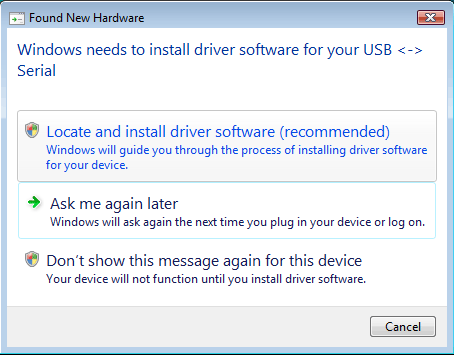
3. Choose the option to "Locate and install driver software".
4. Choose the option to allow Windows to search for the driver online
5. Windows should be able to find, download and install the correct driver
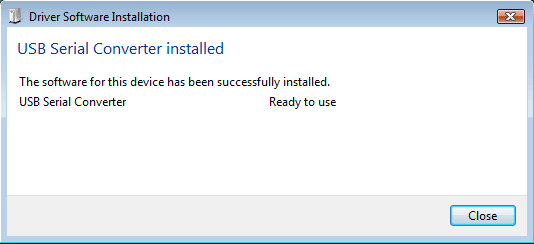
6. If the driver was not found, you can download them here
Once the driver has been installed (or if you already have the driver installed), you should see any entry for
"USB Serial Converter" in your "Device Manager" under the "Universal Serial Bus controllers"
* "Cricut" is a trademark of Provo Craft & Novelty Inc. This site is not affiliated with Provo Craft & Novelty Inc